Linear Barcode Quality Parameters
One of the best interpretations of the ISO spec for linear barcode inspection is the AIM Layman’s Guide found here.
An even more basic interpretation follows with a bit more emphasis on what to do to fix problems, especially with thermal transfer printing which seems to have become the preferred printing technology for variable data barcode printing. If you would like for us to publish more on for other printing technologies such as Flexo or Digital Inkjet please let us know. Contact us an mktg@ais-co.com.
There are two basic characteristics of barcodes that are at least a part of ea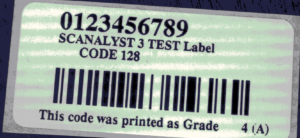 ch of the graded parameters. These basics are contrast and dimensions, or how easy is it to ‘see’ and is ‘everything the right size’. Because contrast, or reflectivity, is at the core of the testing, and because we will be measuring dimensions of the barcodes elements, the first inspection step in to get a good image. We are trying to get an image that shows all the barcode elements with good contrast.
The second step is done by the ISO verifier. 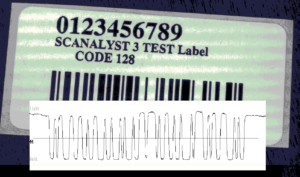 The image is automatically scanned (10 times) to
create scan profiles, sets of analog reflectivity measurements taken as you pass through a barcode. This is what all barcode scanners see as they pass through a barcode while trying to decode it. In the ISO grading system, the scan profile will be used to establish grades for the quality parameters. The scan profile of our example looks like this:
On closer inspection you can see how the trace follows the bars and spaces reflectivity.
The final step in decoding (general scanning) is to digitize the scan profile data using the global threshold as the transition between light and dark or between ‘1’ and ‘0’. The final step in verification is to use the scan profile to evaluate the barcode quality parameters. Each of the parameters are graded and the lowest grade for any one of the parameters is given as the grade for that scan profile. On linear barcodes, 10 scan profiles are taken and the average of the grades is the overall barcode grade.
Parameters described – note that the lowest grade for a parameter becomes the grade for the scan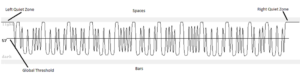
- Edge determination– a critical parameter – a pass/fail – It means that one or more of the transitions from bar to space did not make it across the mean (middle) of reflectivity values – it could not be taken as a transition – was not recognized and therefore was not really a barcode!
- Minimum reflectance – another pass/fail – the difference in reflectivity in a bar vs a space must be 50% (for at least one bar)
- Minimum edge contrast – another pass/fail – reflectivity for each transition is measured and the weakest is used for the grade – has to be greater than 15%
- Symbol contrast – graded – how white is the space and how black is the bar – a measure of the difference between the scans maximum (white space) and minimum (dark bar)
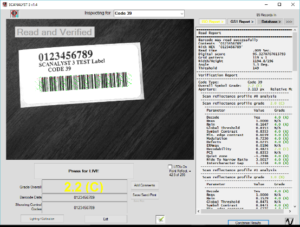
- Modulation – graded – a comparison between the weakest transition to the overall contrast – minimum edge contrast compared to symbol contrast – This reveals if the weakest transition is so weak compared to the overall readability of the code that it is flagged as an issue.
- Defects – graded – measures imperfections in the bars or spaces by evaluating the scan profile for traces that are not uniform
- Decodability – graded – compares the scan profile to the ISO symbology specification for that barcode type to find any variance
- Decode – pass/fail – using the reference decode method described in the symbology specification – if the profile can be decoded properly then it passes
- Quiet Zones – traditional – these are areas on the far left and far right of a barcode – they are left clear of all graphics and text to allow the scanners time to adjust their background value – if it is not clear the scanner could try to decode the barcode with the encroaching text. Quiet Zones are generally required to be at least 10 times the size of the smallest bar in the barcode, the X Dim.
Common issues by parameter (comments based on thermal transfer printing) OR How do I fix it?
- Edge determination – this one is pretty serious – you do not really have a barcode here – look at the scan profile and you will probably spot a trace that does not cross the mean. There are lots of possible causes that can bring out this problem. A very high density barcode with poorly formed bars, a low contrast barcode, etc. You might try to increase the X dim to get better formed bars. Alternatively, you might try printing on a whiter substrate to improve contrast. The example shows the effect of a poorly printed bar.
- Minimum reflectance – bars are just not dark enough – also pretty serious however not often a problem with thermal transfer printing because of the carbon ribbon – if this is inkjet you might try a different foreground color K
- Minimum edge contrast – one of the transitions is too weak – you can either make the background ‘whiter’ by using a different substrate, make the foreground (bars) darker or make the bars a bit bigger (larger X dim)
- Symbol contrast – spaces not light enough and/or bars not dark enough – watch out for special cases such as aluminum or laminates that do not reflect light directly but spread it out (spectral reflectance)
- Modulation – tricky one – it usually means that the narrow spaces are being seen as too narrow – could be caused by overprinting in wet ink (flexo) or mismatch of ribbon/paper in thermal transfer or shiny surface not allowing maximum reflectivity
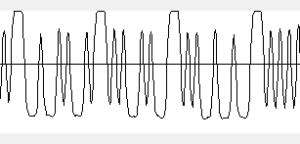
- Defects – easier one – in thermal transfer printing it is usually caused by either: grainy substrate (label), low head temperature or dirty print head, wrong ribbon/paper match, dust on the supplies or in the printer. In wet ink printing, it usually means that the plate needs to be cleaned or replaced.
- Decodability – another tricky one – you usually have a fair bit of tolerance to work with but if you have a really bad decodability grade it usually means that somewhere along the way the rules for this barcode type were not followed – in thermal transfer printing (or any digital printing) it may have been caused by distortion when trying to scale the barcode to fit into a specific spot – in wet inks it could be caused by the plate manufacturer not providing the correct bar width reduction to compensate for ink bleed, plate compression and wear.
- Decode – You might check the printer. An element may have burned out in the print head or there is a lot of dirt on it. You may have to go back to check the design software as well.
- Quiet Zones – easy one – make room or leave enough white space – watch out for label edges vs. backing paper edges.